Qualification Catalog
The Qualification Catalog holds the individual qualifications a substitute can be recorded as holding. Each one belongs to exactly one Issuing Authority, so the catalog is maintained one authority at a time.
Path: Administration menu -> Qualification Catalog
Note: This page is available to Application Administrators and System Administrators. Nothing in the rest of SmartSub reads the qualification catalog yet, so entries made here have no effect on notifications, eligibility, or candidate ranking today.
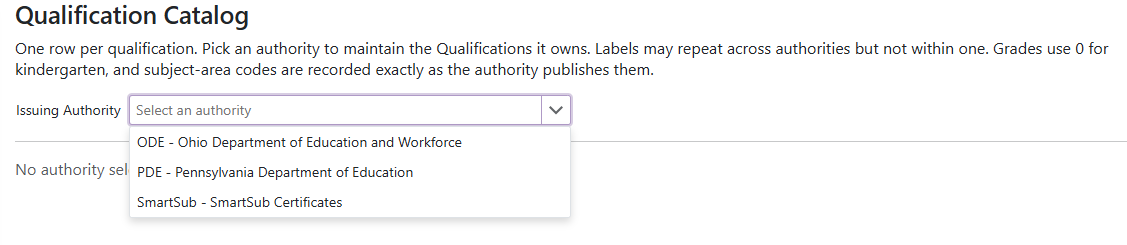
Choosing an Authority
- Pick an authority from the Issuing Authority dropdown to see and maintain the qualifications it owns. Until you do, the page shows No authority selected.
- Add the authority on the Issuing Authorities page first if it is not in the list.
The Grid
- Label: the qualification's name as the authority publishes it, for example
Instructional I - Mathematics 7-12. - Code: the authority's own code for it, if it publishes one.
- Subject Areas: the authority's subject-area codes, recorded exactly as published.
- Grades: the grade range the qualification covers.
- Effective and Retired: the dates the qualification came into use and stopped being issued.
- Sort: controls the order qualifications appear in.
Add or Edit a Qualification
- Click the add button in the command column header to create a qualification, or the
 on a row to change one.
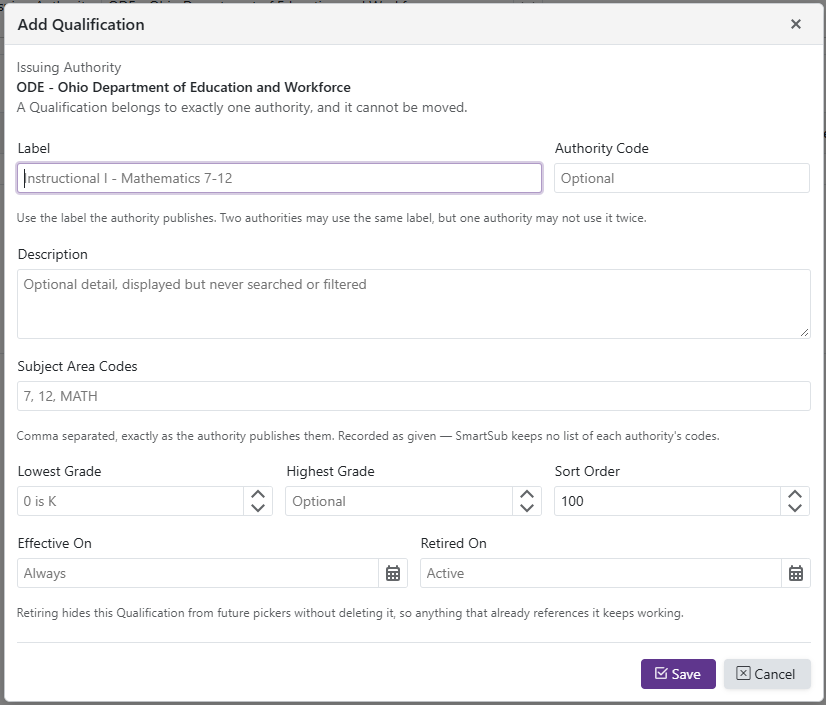
- Label is required. Use the label the authority publishes. Two authorities may use the same label, but one authority may not use it twice.
- Authority Code, Description, Subject Area Codes, and the grade range are all optional.
- Subject Area Codes are comma separated and recorded exactly as the authority publishes them. SmartSub keeps no list of any authority's codes, so nothing is validated against a master list.
- Lowest Grade and Highest Grade are numbers, where 0 means kindergarten.
- Description is displayed but never searched or filtered.
- Effective On and Retired On bound the qualification's working life. Leaving Effective On blank means it has always applied; leaving Retired On blank means it is still active.
- Retiring a qualification hides it from future pickers without deleting it, so anything that already references it keeps working.