User Maintenance
The User Maintenance page lists every user account and is where accounts are created, edited, and removed.
Path: Administration menu -> User Maintenance
Note: This page is available to Reseller Administrators, Application Administrators, and System Administrators, but not every action on it is available to every one of those roles. See Who Can Do What below.
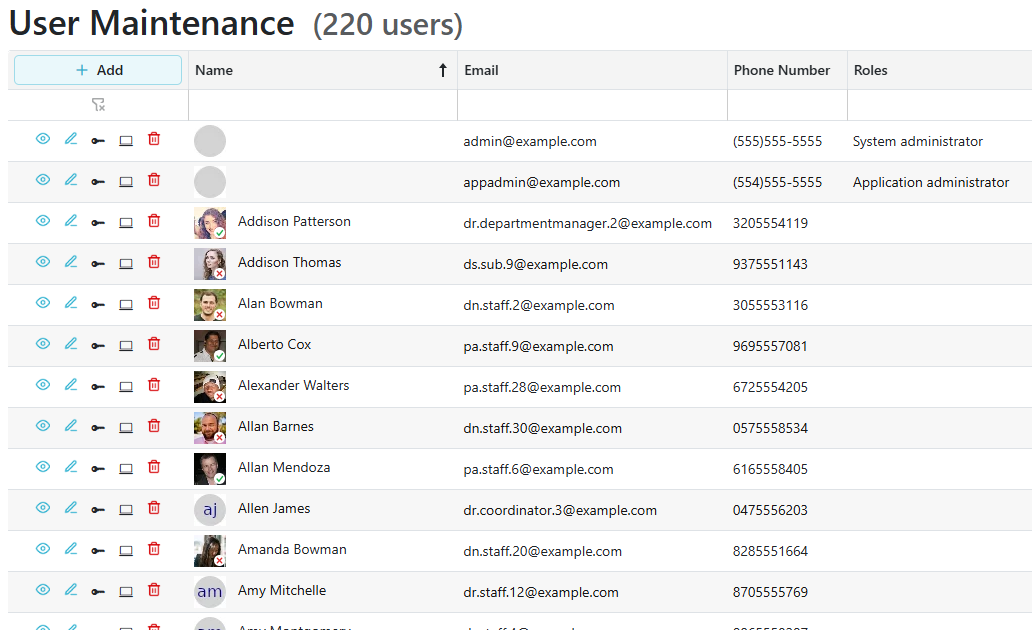
- The grid lists users by Name, Email, and Phone Number. Use the filter row under the headings to narrow the list.
Who Can Do What
| Action | Reseller Administrator | Application Administrator | System Administrator |
|---|---|---|---|
| View a user's details | Yes | Yes | Yes |
| Reset credentials | Yes | Yes | Yes |
| Add a user | No | Yes | Yes |
| Edit a user | No | Yes | Yes |
| Manage sessions | No | Yes | Yes |
| Delete a user | No | Yes | Yes |
| Change a user's roles | No | No | Yes |
Row Actions
-
Click the
 to open the user's full details, including their organizational relationships and audit history. See User Details.
 -
Click the
 to open the edit form described below.
 -
Use Reset Credentials to send the user through the credential reset process.
-
Use Manage Sessions to see and revoke that user's active sessions. This shows the same device and IP detail, and offers the same revocation, as the Session Maintenance page.
-
Click the
 to delete a user, then confirm.
 -
Use the add button in the command column header to create a new user.
Basic Info
The edit form opens on the Basic Info tab.
- Account Info shows the user's Email, Phone Number, whether each has been confirmed, and whether Two Factor is enabled.
- Person Name holds the user's First Name and Last Name, both editable.
Roles
The Roles tab is visible only to a System Administrator. Nobody else sees it, including Application Administrators.
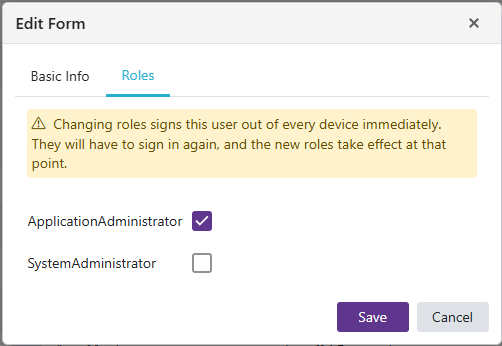
- Select or clear a checkbox for each role the user should hold. Only roles that can be assigned directly are listed; roles a user holds through an organizational relationship are not set here.
Note: Changing roles signs the user out of every device immediately. They have to sign in again, and the new roles take effect at that point.