Allowed Locations
The Allowed Locations page lists every location you are authorized to work at, along with the Substitute Management Unit that authorized you. It lets you control, per location, whether you are notified about openings there and whether you are eligible for them at all.
This page appears under Manage Account only if you are authorized at one or more locations.
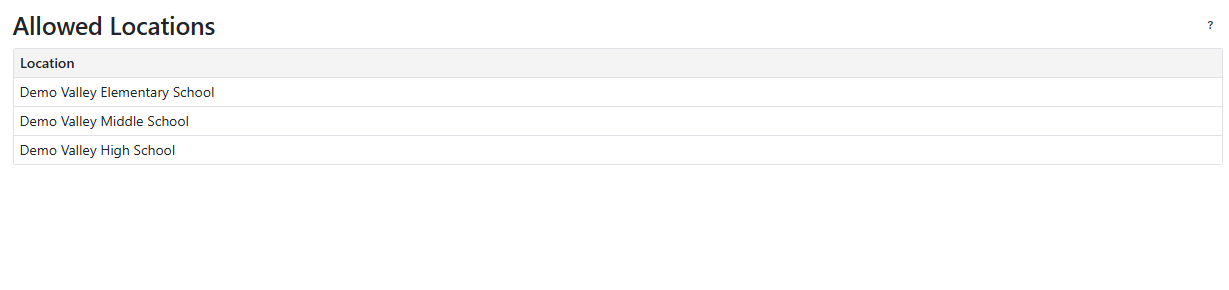
Notifications & Eligibility
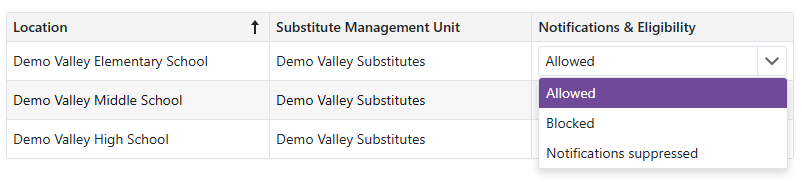
Use the Notifications & Eligibility dropdown on a location's row to choose one of three settings. The change saves as soon as you pick it.
- Allowed: the default. You are notified about openings at this location and you are eligible for them.
- Notifications suppressed: you stop receiving notifications about this location, including in the nightly digest. You stay eligible, so the location's openings still appear in Available Openings and you can still accept them. Use this when you are happy to work somewhere but do not want to be alerted every time.
- Blocked: you become ineligible for openings at this location. You are not notified, the openings do not appear in Available Openings, and a manager or coordinator cannot assign you there anyway.
Note: Blocked here is your own decision and cannot be overridden by the location. It is separate from the location's own preference for you, which the location controls and you cannot change.
- Your setting is per location and per Substitute Management Unit. If you are authorized at the same location through two units, each row is set independently.
- Your setting survives being re-invited to the location. A new invitation does not reset it back to Allowed.
- To start receiving openings from a location again, set it back to Allowed.