Traces
The Traces page shows the API requests that clients' systems send to SmartSub, so you can see exactly what arrived and how SmartSub answered when a client asks why an opening didn't come through.
Who Uses This
- Application Administrator
- System Administrator
Navigation Path
- Administration menu > Traces
The Traces Grid
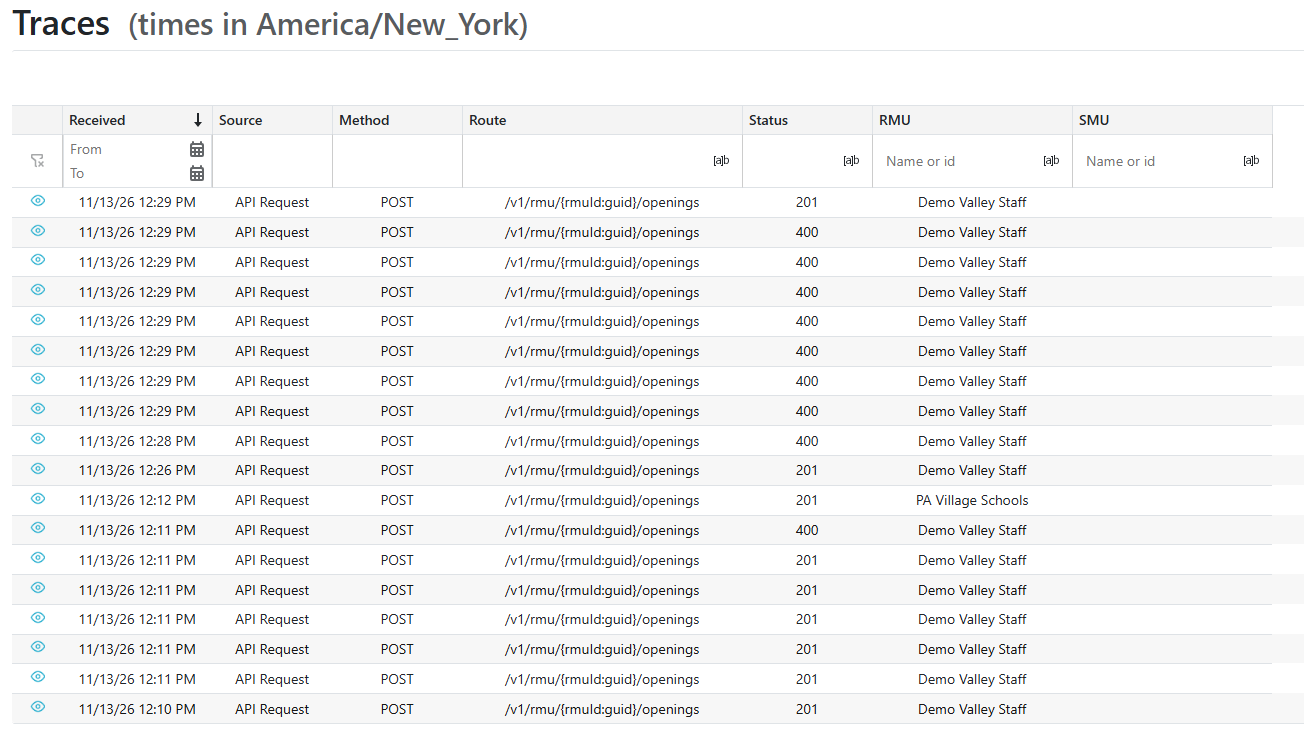
- Each row is one request: when it was Received, its Source, Method, Route, and Status, and the RMU and SMU it was for. The newest requests are at the top.
- Duration (ms), Organization, External ID, Opening ID, and Trace ID are hidden until you turn them on from the Column Chooser.
- Times are shown in your browser's time zone, which is named next to the page title.
- Use the filter row to narrow the list:
- Received: pick a From and To date.
- Status: type the start of a status code, for example 4 to see every request that was refused.
- RMU and SMU: type a name or an ID.
- Opening ID: turn the column on, then type the exact ID.
- Traces are kept for 30 days.
Viewing a Request
- Click the
 on a row to see the request's details and the body that was received.
- If SmartSub refused the request, the error is shown at the top.
- Click the
 to copy the body, for example to send it to the client.
- If the body was larger than the size limit, a notice says it was cut off and may be incomplete.